|
| MailAddiction's web-based email marketing solution provides features that are simple and powerful. Our easy to use campaign design tools are effective and deliver immediate results. Along with our list manager, tracking and reporting, and live performance monitor, MailAddiction makes it easy to manage your customers. |


Effective Email Campaign Manager |
« Back Next » |
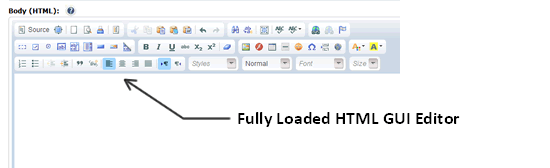
Creating an effective email campaign takes no more than a few simple clicks. Our WSIWYG (what you see is what you get) design tools provide our customers with everything you need to quickly design a successful email campaign. Use the rich features of the WYSIWYG tools:
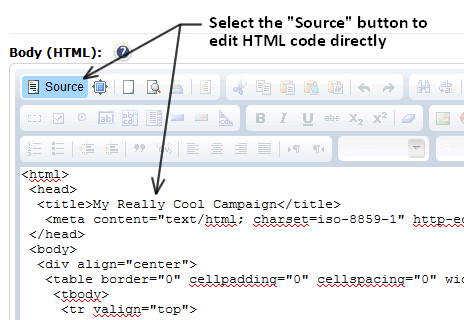
Edit and view the source code directly just as a veteran HTML designer:
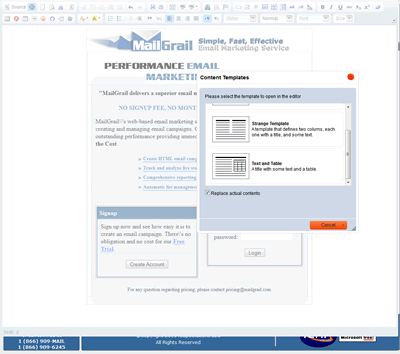
View in full screen mode for convenience, choose a new format from many proven templates:
Designing an email campaign has never been easier! |
|
Online Email Campaign Design |
|
| MailAddiction, an Email Marketing Service company provides our clients the best online tools to successfully design, manage and analyze campaigns, and much more. | |
Building an Email Campaign, Step by StepA typical campaign moves through four stages, all handled in the same editor:
|
|
Common Campaign Design MistakesMost underperforming campaigns share the same handful of avoidable problems:
|
|
Email Campaign Design Checklist
|
|
Email Campaign Design FAQDo I need HTML knowledge to design a campaign?No. The WYSIWYG editor handles layout and formatting visually. Source code editing is available if you want more direct control. Can I reuse a past campaign?Yes. One-click duplication lets you start a new send from any existing campaign instead of rebuilding it from scratch. Does MailAddiction include AI writing help?Yes. AI-assisted drafting can generate subject line and body copy variants, which you then edit and approve in the same editor. How many templates are available to start from?MailAddiction includes a library of proven layouts across common campaign types — promotions, newsletters, and announcements — so you're rarely starting from a blank canvas. Can I switch between the WYSIWYG editor and source view on the same campaign?Yes. Both views edit the same campaign, so you can move between visual editing for layout and source view for fine control as often as you need. |
|
From First Draft to Sent CampaignA new account's first campaign usually takes longer than every one after it — mostly because there's no prior send to reuse as a starting point. After the first few campaigns, most of the work shifts from building a layout to adjusting one that already works: swapping the offer, refreshing the subject line, and updating a handful of details rather than designing from scratch. That's the point of one-click duplication — the second campaign should take a fraction of the time the first one did. The same applies across a small team. Because templates and past campaigns are shared on the account, a colleague can duplicate someone else's proven layout instead of learning the editor from zero, which keeps design quality consistent even when more than one person is sending. |
|
| Build your first campaign with our free trial (2,500 emails, no credit card), and compare pay-as-you-go email marketing pricing when your send volume grows. See the full email campaign management guide for the end-to-end workflow. | |
| « Back Next » | |