|
| MailAddiction's web-based email marketing solution provides features that are simple and powerful. Our easy to use campaign design tools are effective and deliver immediate results. Along with our list manager, tracking and reporting, and live performance monitor, MailAddiction makes it easy to manage your customers. |


Schedule and Automate Email Campaigns |
« Back Next » |
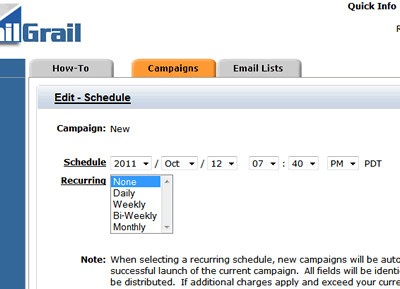
Schedule email campaigns to launch on any interval or time of day. You can choose to have your campaigns sent daily, any specific day of the week, weekly, bi-weekly, or monthly. The scheduling is supplied as a simple drop down menu which provides clients with the necessary options to launch and manage email campaigns:
|
|
Manage Recurring Email Campaigns |
|
| MailAddiction's campaign scheduler is simple and easy to use. We're providing our clients the best email marketing tools to manage and maintain all aspects of online marketing. | |
Choosing the Right Send CadenceThe right schedule depends on what you're sending, not a fixed rule:
Scheduling ahead also lets you plan a matching social post for the same offer, so email and social reinforce each other instead of going out separately. A cadence that's too aggressive tends to raise unsubscribe rates faster than it raises revenue, while one that's too sparse lets subscribers forget why they signed up — most senders find their right pace only after a few cycles of watching open and unsubscribe trends together. |
|
Time Zones and Send-Time TimingScheduling a send is easy; scheduling it for the right moment takes a bit more thought. A few practical guidelines:
|
|
Campaign Scheduling Checklist
|
|
Email Scheduling FAQCan I set up a recurring campaign instead of scheduling each send manually?Yes. Choose daily, weekly, bi-weekly, or monthly recurrence from the scheduling menu instead of re-scheduling every send by hand. Can I schedule email and social posts together?Yes. You can plan send timing and coordinate a companion social post from the same workflow. Can I change a scheduled send before it goes out?Yes. Scheduled campaigns can be edited or rescheduled any time before the send window begins. What happens if I need to pause a recurring campaign?A recurring send can be paused or canceled from the scheduling menu at any point — it doesn't have to run its full course once it's set up. Should I schedule every campaign for the same time of day?Not necessarily. A consistent time builds a predictable rhythm for newsletters, but time-sensitive offers often perform better scheduled around the moment they're most relevant rather than a fixed daily slot. |
|
Scheduling Around Real-World Sending PatternsMost senders don't settle on a permanent schedule right away — the right cadence for a brand-new list is rarely the right cadence six months later, once you have actual engagement data to work from. A common pattern is starting with a lighter, more conservative schedule while a list is new and its engagement habits are still unknown, then increasing frequency gradually as open and click data confirms subscribers want to hear more often. It's also worth scheduling with slack built in rather than back-to-back sends with no room to react. If a campaign's early bounce or complaint numbers look off, having the next scheduled send a few days out — rather than the next morning — gives time to investigate before compounding the issue. See the full email campaign management guide for how scheduling fits into the rest of the process. |
|
| Start automating recurring sends with our free email marketing trial (2,500 emails, no credit card), and move to pay-as-you-go plans when your campaign cadence increases. | |
| « Back Next » | |