|
| MailAddiction's web-based email marketing solution provides features that are simple and powerful. Our easy to use campaign design tools are effective and deliver immediate results. Along with our list manager, tracking and reporting, and live performance monitor, MailAddiction makes it easy to manage your customers. |


Email Campaign Reporting & Tracking Services |
« Back Next » |
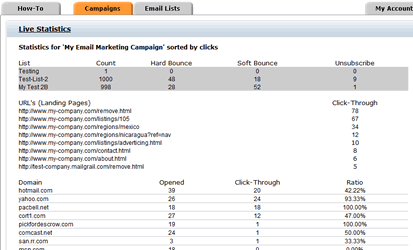
MailAddiction provides tools to properly and effectively monitor and analyze all aspects of email campaign tracking. Real time monitoring and statistics are provided for each and every campaign, display the top (most active) domains, how many emails have reached the inbox (how many recipients have viewed your email), how many have clicked on your ad, which links have been followed and how many times the links have been clicked. Our automated tools track bounced messages and unsubscribe's, intelligently deciding which recipients to keep active and which to suppress.
Monitoring an email campaign becomes no more than a simple and quick glance. |
|
Email Campaign Monitoring, Analytics, Statistics & More |
|
| With MailAddiction's online services, our clients are equipped with the most efficient Email Marketing tools to actively engage and strategize campaigns. | |
What to Watch While a Campaign Is LiveReal-time monitoring is most useful in the first hours after a send, when most opens and clicks happen:
|
|
Real-Time Monitoring vs. Historical ReportingLive monitoring and detailed reporting serve different moments in a campaign's life:
Checking live statistics without ever reviewing the historical trend means every campaign gets judged in isolation — a single measurement, not a pattern. Both views draw from the same underlying tracking, so nothing extra needs to be set up to use either one. |
|
Live Monitoring Checklist
|
|
Campaign Monitoring FAQHow soon can I see results after sending?Opens, clicks, and bounces are tracked in real time, so activity appears in your reporting as recipients interact with the email. What happens to bounced or unsubscribed addresses?They're automatically identified and suppressed from future sends, so you don't have to clean the list manually. Can I see which links get the most clicks?Yes. Click tracking is broken down by individual link, so you can see exactly which offer or call to action performed best. Should I make changes to a campaign while it's still sending?Early signals like a bounce spike are worth investigating right away, but wait until a send is complete before drawing conclusions about overall performance — opens and clicks keep arriving for hours after launch. Can I compare live results to a previous campaign while a send is still in progress?Yes. Because monitoring and reporting share the same data, you can check an in-progress campaign's early numbers against a past campaign's reporting at any time. |
|
Turning Monitoring Into a Habit, Not a One-Time CheckThe value of live monitoring compounds the more consistently it's used. Checking statistics on one campaign tells you how that campaign did. Checking every campaign, even the routine ones, builds a running sense of what "normal" looks like for your list — which makes it far easier to notice when a send is genuinely underperforming versus just having an average day. That baseline is also what makes anomalies actionable. A bounce rate that looks unremarkable on its own can be a clear warning sign once you know it's double what your list normally runs — context that only comes from watching the numbers regularly, not just when something already seems wrong. Monitoring is one step in a larger process — see the full email campaign management guide for how it connects to planning and reporting. |
|
| See live campaign tracking in action by starting a free trial account (2,500 emails, no credit card), then choose pay-as-you-go pricing as your reporting needs expand. | |
| « Back Next » | |